


WordPress Themes: A Beginner’s Guide to Choosing and Installing
When you create a WordPress website, one of the first things you need to decide is how your website should look and feel. This is where WordPress themes come in.
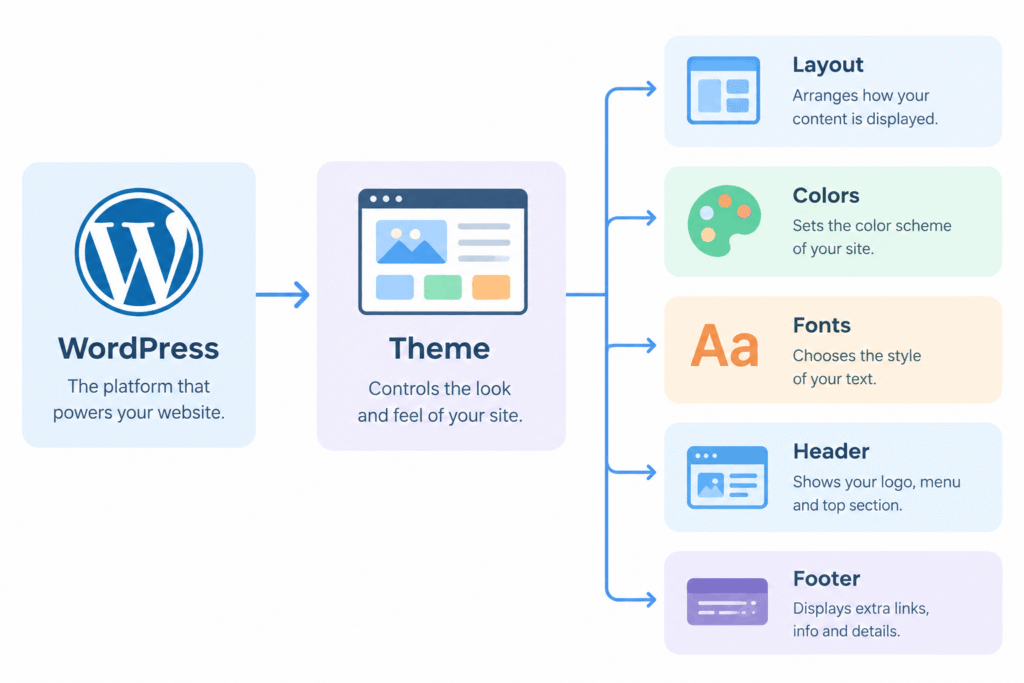
A theme controls many visual parts of your website, including its layout, colors, typography, headers, footers, menus, and overall design. You do not need to build all these elements from scratch.
For beginners, choosing and installing a suitable theme can make website creation much easier. In this guide, you will learn what WordPress themes are, how to choose one, the difference between free and premium options, and how to install and activate a theme step by step.
If you haven’t installed WordPress yet, first follow our guide on How to install WordPress and then return here to choose and customize your theme
What Is a WordPress Theme?
A WordPress theme is a collection of files that controls the appearance and design of a WordPress website.
Think of your website as a house. WordPress provides the basic structure, while the theme determines how the house looks. It can control the colors, fonts, page layouts, navigation areas, header, footer, and other visual elements.
Before working with themes, it is helpful to understand the main tools available in your WordPress Dashboard.
Why Are WordPress Themes Important?
A theme is important because it gives your website a consistent visual structure without requiring you to design every element manually.
A suitable theme can help you:
- Create a professional-looking website
- Set a consistent design across pages
- Customize colors and fonts
- Create navigation menus
- Control page and blog layouts
- Improve the mobile appearance of your site
- Add or customize headers and footers
- Save time during website development
However, a theme is not automatically good just because it looks attractive. You should also consider its features, customization options, updates, compatibility, performance, and support.
How to Choose a WordPress Theme
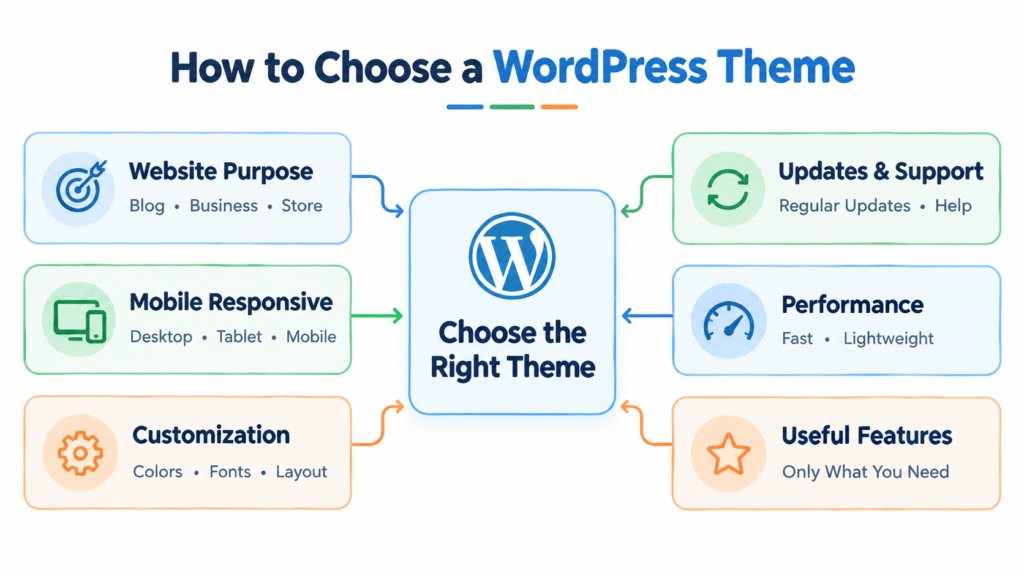
There are thousands of themes available, so choosing one can feel confusing when you are starting out.
Instead of selecting a theme only because its demo looks good, check whether it actually fits your website’s purpose.
1. Choose a Theme That Matches Your Website
Think about what type of website you are creating.
For example:
A blog may need a clean reading-focused layout.
A business website may need service sections and clear calls to action.
An online store may need strong WooCommerce support.
A portfolio may need attractive image layouts.
A news website may need a content-heavy structure.
Your theme should support the type of content you plan to publish.
2. Check Customization Options
Look at how easily you can change:
Logo
Colors
Fonts
Header
Footer
Menus
Page layouts
Blog layouts
Sidebar settings
A theme with useful customization options can save you from making unnecessary technical changes later.
3. Check Mobile Responsiveness
Many visitors use smartphones to browse websites. Therefore, your website should look and work properly on different screen sizes.
Before choosing a theme, check its demo on:
Desktop
Tablet
Mobile
Pay attention to menus, text size, images, buttons, and spacing.
4. Check Updates and Support
A theme should be maintained and updated by its developer.
Regular updates can help maintain compatibility with newer versions of WordPress and other software.
For premium themes, also check what type of customer support is included.
5. Avoid Unnecessary Features
More features do not always mean a better theme.
If you are creating a simple blog, you may not need a theme packed with dozens of features that you will never use.
A lightweight theme with the features you actually need can make website management simpler.
Free vs Premium WordPress Themes
One of the most common questions beginners have is whether they should use a free theme or purchase a premium one.
Both options can be useful. The right choice depends on your website requirements and budget.
What Are Free Themes?
Free themes are available without purchasing a theme license.
You can find many free options through the official WordPress theme directory. These themes can be a good starting point for beginners who want to build a website without spending money on its design.
Free does not necessarily mean poor quality. However, individual themes can differ significantly in terms of features, customization, support, and update frequency.
Advantages of Free Themes:
1) No theme purchase cost
2) Easy to test
3) Good for beginners
4) Many options are available
5) Useful for simple websites and blogs
Limitations of Free Themes:
Some free themes may offer fewer customization options or additional features compared with their paid versions.
If you are a beginner then it is best to go with free theme.
Support options can also vary depending on the theme developer.
What Are Premium Themes?
Premium themes are themes that require payment for access to some or all of their features.
Depending on the developer, a premium theme may include additional customization options, starter templates, support, advanced design controls, or other features.
Some developers use a freemium model, where the basic theme is free and advanced features are available through a paid version.
Advantages of Premium Themes:
1) More customization options
2) Additional features
3) Premium support may be included
4) More templates or design options
5) Additional tools for specific website types
Things to Consider
A premium theme is not automatically the right choice for every website.
Before purchasing one, check:
Pricing
License duration
Renewal cost
Included features
Support period
Update policy
Compatibility with your WordPress setup
Free vs Premium Themes: Quick Comparison
| Feature | Free Theme | Premium Theme |
| Initial cost | Usually free | Paid |
| Basic design | Usually available | Usually available |
| Customization | Varies | Often more options |
| Support | Depends on developer | Often more extensive |
| Advanced features | May be limited | Usually more available |
| Templates | Varies | Often more choices |
| Updates | Depends on developer | Depends on developer |
The important point is that price should not be the only factor. Look at what your website actually needs.
Can You Change a WordPress Theme Later?
Yes, you can change your theme later.
Changing a theme does not normally delete your posts and pages because your content and theme are separate parts of WordPress.
However, changing themes can affect:
- Website layout
- Menus
- Widgets
- Theme-specific settings
- Custom CSS
- Header and footer designs
- Some theme-specific features
Therefore, it is a good idea to create a backup before making a major theme change.
Simple Theme Change Process
Current Theme
↓
Create Backup
↓
Install New Theme
↓
Activate New Theme
↓
Check Pages & Posts
↓
Check Mobile Design
↓
Fix Layout/Settings
↓
Publish
Common Mistakes Beginners Should Avoid
When selecting or installing WordPress themes, beginners often make a few avoidable mistakes.
Choosing a Theme Only Because It Looks Good
A beautiful demo does not necessarily mean the theme is suitable for your website.
Check its features, customization options, responsiveness, updates, and compatibility.
Installing Too Many Themes
You generally only need one active theme. Keeping many unused themes can make your dashboard unnecessarily cluttered.
Remove themes that you do not need, while keeping an appropriate fallback theme if required.
Ignoring Mobile Design
Always check how your website looks on a phone after making major design changes.
Installing Themes From Untrusted Sources
Download themes from trusted sources. Avoid modified or unofficial theme packages because they can introduce security and compatibility problems.
Changing Themes Without a Backup
A backup gives you a safer way to recover if something goes wrong.
What Should Beginners Choose?
There is no single theme that is perfect for every website.
If you are starting a simple blog, focus on:
Clean design
Easy customization
Good mobile support
Useful layout options
Regular updates
Compatibility with your required plugins
Features you will actually use
You can start with a free theme and move to a premium version later if your website needs additional functionality.
The goal is not to find the theme with the largest number of features. The goal is to find one that supports your website without making it unnecessarily complicated.
Final Thoughts
WordPress themes make it much easier to create and customize the appearance of a website without designing everything from scratch.
As a beginner, start by understanding what a theme does, compare free and premium options based on your actual requirements, and learn how to install and activate one safely.
If you are new to WordPress, you can continue with our guide on the WordPress Dashboard to understand the main tools and settings available in your website.
You can also learn how to install WordPress before moving on to theme customization.